

4‑Channel AHD Rugged Tablet for Vehicle Video & Fleet Safety Monitoring
Industrial Android tablet with hardware‑level 4‑channel AHD camera input. Provides the hardware foundation for ADAS, blind-spot detection, passenger surveillance, and driver monitoring software.
MDT880 + CRD880 | 4‑Channel AHD Camera Integration Demo
What Is a 4‑Channel AHD Vehicle Tablet?
A 4‑channel AHD rugged tablet is an in‑vehicle Android device that integrates up to four AHD (Analog High Definition) cameras directly — without requiring external DVRs or video encoders. It serves as a combined display and telematics gateway for fleet safety applications.
Unlike consumer tablets, which support only USB webcams, our solution provides hardware‑triggered, synchronized camera inputs with ignition‑controlled operation — ready for ADAS, DMS, 360° surround view, and passenger surveillance.
Three Deployment Architectures
The tablet can receive camera input in three ways, depending on what happens to the video after capture. Dock-connected cameras feed the tablet directly through the cradle — best for live assistance and event capture. A Camera Hub (HH420 / HH421) encodes video externally and adds local recording with multi-day retention. An external MDVR handles continuous 24-hour recording and evidence-grade storage for five or more channels. The vehicle camera architecture guide covers the decision in detail.
4‑Channel Rugged Tablet: Key Capabilities

4× AHD Camera Input
Direct connection to up to four AHD cameras — front, rear, side, and interior. Supports 720p/1080p.
4× Trigger Inputs
Connect to turn signals, reverse gear, brake, and door sensors for automatic view switching.

Real‑Time Upload
4G/5G + GPS enables live video streaming and event‑based clip upload to fleet platforms.

Vehicle Power Integration
9-36V wide voltage with ignition sense — the tablet follows the vehicle power state.
Two Integration Paths for 4‑Channel Video
Choose the cradle that matches your tablet platform
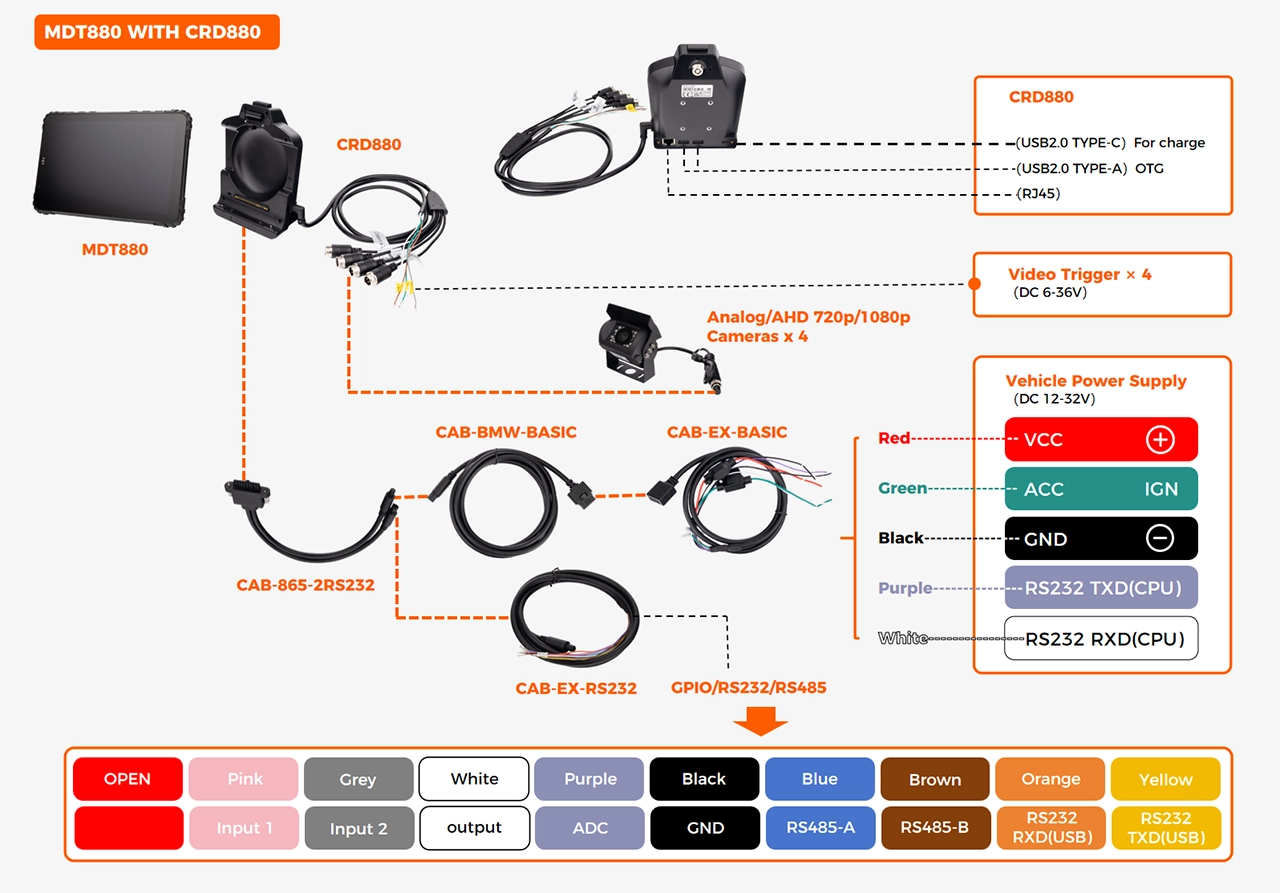

MDT880 + CRD880
All‑in‑one cradle: 4× AHD camera inputs, 4× triggers, and vehicle power — no external hub required.
4× AHD cameras
4× trigger inputs
9-36V / ignition sense
Pogo‑pin docking

MDT865 + CRD865 TYPE‑F
Flexible configuration: CRD865 TYPE‑F supports 4‑channel AHD via external hub + 1 direct AHD on cradle (up to 5 cameras total). Ideal for complex retrofits and multi‑camera coverage.
4× AHD cameras via hub
4× triggers with extension
9-36V / ignition sense
Ideal for retrofits and custom I/O
View full cradle selection matrix →
HH420 / HH421 Camera Hub
When the deployment needs continuous local recording with multi-day retention but does not require a full MDVR, an external camera hub sits between the cameras and the tablet. The hub accepts up to four AHD or analog cameras, encodes the video in the hub itself, and outputs RTSP streams over Ethernet. The tablet decodes the stream it needs to display — the heavy encoding work happens off the tablet.
HH420 provides live RTSP output only. HH421 adds an internal hard disk for continuous recording, with 512 GB, 1 TB, and 2 TB options providing approximately 2.2, 4.5, and 9 days of 1080p retention.

Compatible cradles: CRD865 · CRD865-BAS · CRD880 · CRD1065. The hub connects to the cradle via a dedicated cable; the tablet docks into the cradle as usual.
When to Consider an External MDVR Instead
For deployments that require continuous 24-hour recording across the full shift, chain-of-custody evidence, or more than five camera channels, the recording workload belongs on a dedicated MDVR rather than the camera hub or the tablet.
The tablet, the camera hub, and the MDVR are not alternatives — they are three subsystems of a single vehicle architecture. The vehicle camera architecture guide covers the thermal, storage, and latency differences between the three approaches.
4‑Channel Tablet Applications
Deploy vehicle video across key fleet safety scenarios
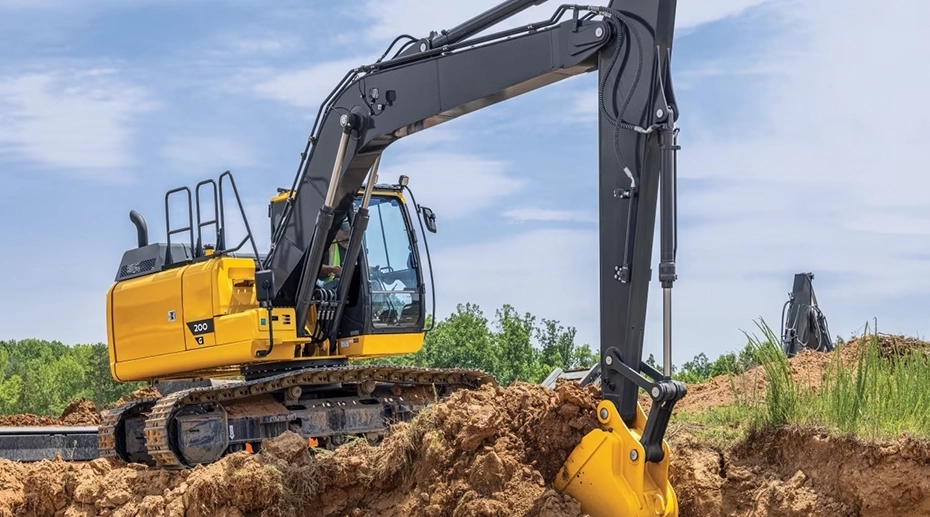

Consumer Tablet vs 4‑Channel AHD Tablet
| Feature | Consumer Tablet | JAXICLOUD FLEET MANAGEMENT 4‑Channel AHD Tablet |
|---|---|---|
| Camera Inputs | ✕ USB webcam only | ✓ 4× AHD (hardware‑level) |
| Trigger Inputs | ✕ None | ✓ 4× (signal/brake/reverse/door) |
| Vehicle Power | ✕ 5V USB only | ✓ 9-36V with ignition sense |
| Mounting | ✕ Suction cup | ✓ Vehicle dock + anti‑vibration |
Three Video Architectures at a Glance
The right architecture depends on the video retention requirement, not the camera count
| Dimension | Dock-Connected | Camera Hub (HH421) | External MDVR |
|---|---|---|---|
| Video Workload | Live display, event capture | Live + continuous recording | Continuous, chain-of-custody |
| Retention (1080p) | Minutes (event clips) | 2.2 – 9 days | Days to weeks |
| Camera Channels | 1–4 | 1–4 | 5–8+ |
| Latency to Display | Sub-50ms | 100–300ms | 100–300ms |
| Typical Deployments | Forklifts, utility vehicles, taxis | Buses, delivery vans, light commercial | Long-haul trucks, hazmat, passenger transport |
Frequently Asked Questions
How many cameras can be connected?
Both MDT880 and MDT865 support up to 4 AHD cameras directly via compatible cradles (CRD880 for MDT880, CRD865 series for MDT865). For projects requiring more than 4 cameras, an external camera hub can be added to support up to 5 total AHD inputs. Contact our team for custom camera configurations.
When should I use an MDVR instead of a dock-connected tablet?
Use a dock-connected tablet when the video workflow is live assistance, event-triggered capture, or AI inference on a small number of streams. Use a camera hub like the HH421 when you need continuous recording with multi-day retention but not evidence-grade storage or more than four channels. Use an external MDVR when the deployment requires 24-hour continuous recording, chain-of-custody evidence, or five or more camera channels recorded simultaneously. The vehicle camera architecture guide covers the decision in detail.
Can the hardware run ADAS or DMS software?
JAXICLOUD FLEET MANAGEMENT provides the hardware platform only — we do not supply ADAS, DMS, or vision algorithms.
Can video be uploaded in real time?
Yes. With 4G/5G and GPS, the tablet can stream live video or upload event‑based clips (e.g., harsh braking, trigger activation).
What's the difference between CRD880 and CRD865 cradles?
CRD880 is designed for MDT880 with 4 direct AHD camera inputs — ideal for standard vehicle video deployments. CRD865 series (for MDT865) offers flexible I/O options and supports external camera hub expansion for up to 5 cameras. Choose based on your tablet platform and camera count requirements.
Can I customize camera count or trigger configuration?
Software customization is handled by the customer's own software or third-party vision vendors using our SDK. Contact our video integration team →
Related Technical Applications
Choose your video integration path — same tablet platform, different I/O configurations
Related Technical Reading
Ready to Add 4‑Channel Video to Your Fleet?
Get a quote, request a video demo kit, or talk to our integration engineers.